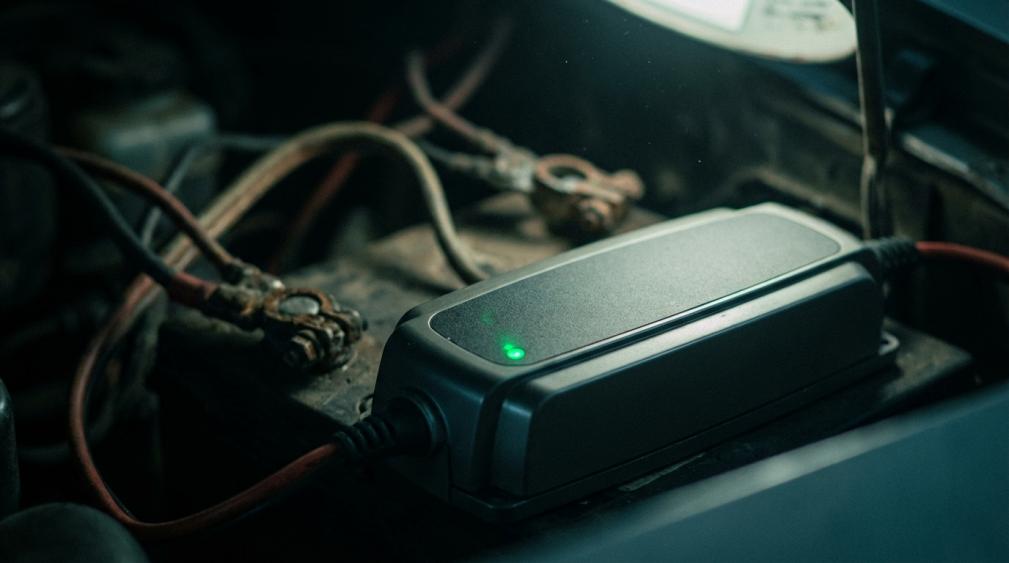

On most modern chargers, a steady green light means the unit believes the battery is full, but you still need a few checks to confirm battery health, connection quality, and real-world performance.
Is your charger stubbornly glowing green while your boat, RV, or backup system still feels weak and unreliable? Maybe the trolling motor fades, headlights dim, or radios die early, yet the charger insists everything is "ready." Manufacturer guides from Battery Tender, Minn Kota, Motorola, and detailed case studies on boat battery monitors show that a single green LED can be both helpful and misleading. The goal here is to turn that little light into a reliable decision tool so you know when green really means "good to go," when it hints at trouble, and how to confirm whether the charger, the battery, or the wiring needs an upgrade.
What "Green" Really Means on Real-World Chargers
Most smart chargers do not use green to mean "charging hard." They use green to say, "I recognize a battery and I believe it is already charged or nearly charged."
Battery Tender's indicator guide is a clear example. Their chargers use a simple pattern: a flashing red light means charging has not started, a steady red light means active charging, a flashing green light signals the battery is over roughly 80 percent, and a solid green light means the battery is fully charged and being maintained. Technical notes from Battery Tender and High-Tech Battery Solutions emphasize that the charger must bring the battery up to about 14.6 volts before it switches from red to green, and that this step can legitimately take as long as about 72 hours on a tired battery. That is a long time, but it shows that green is reserved for "I have reached my target."
Minn Kota's Precision marine chargers use similar logic, just with more LEDs. Yellow lights at 25, 50, and 75 percent show progress as the charger pushes through its bulk and absorption phases. When the 100 percent LED flashes green, the battery is full and in an active maintenance mode; when that same LED later goes solid green, the charger has shifted into a long-term storage mode but still wakes up if voltage sags below about 12.6 volts. Here again, green is not "working hard"; it is "topped up and watched."
The same theme appears in professional gear. Motorola's IMPRES radio chargers use a steady red light during rapid charge, a flashing green light once the battery is above about 90 percent and being topped off, and a steady green light once the pack is fully charged. NavVis takes a different approach on one of its scanning system chargers, where a solid orange light, not green, is the "battery fully charged" indication. That is proof that you cannot assume every device treats green the same, but in each case, manufacturers reserve a distinct "full" color or pattern once the charger believes it is done.
A practical takeaway is simple: on documented chargers from Battery Tender, Minn Kota, and Motorola, green appears only after the charger has recognized a battery and pushed it through most or all of the charge routine.

If your charger behaves like these, a stable green LED means "this unit thinks the battery is full," not "no connection" and not "hard charging."
Could a Green Light Mean "Not Connecting"?
The worry behind the question usually sounds like this: "If the light is green all the time, maybe the charger never actually grabbed the battery."
Look at how real chargers signal connection problems. Minn Kota's Precision series uses a solid red charger LED to shout about a battery connection issue, while other colored progress LEDs stay low. Battery Tender's documentation says a flashing red or yellow light usually points to a connection problem or a battery so deeply drained that the charger cannot recognize it. Their support guidance tells you to recheck every connection, inspect the inline fuse near the battery, and confirm that the battery has at least about 3 volts at the terminals before the charger will even start. Motorola's IMPRES guides say a flashing red light means no contact or an unchargeable battery and recommend reseating the pack and cleaning the gold contacts.
None of those systems use a clean, steady green light to mean "I see nothing connected." Instead, they either go dark, stay red, or flash a warning pattern.
So for most modern smart chargers that follow these patterns, a solid green light while the charger is powered usually means the opposite of "not connected." It means, "I believe the battery is attached and do not need heavy charging right now." If the system still performs poorly, the question is not "Is there a connection?" but "Is the battery actually any good?" or "Is the charger doing what it claims?"
There is one more twist. Manufacturers like Battery Tender note that their chargers will not start on an extremely flat battery, often below about 3 volts. In that situation you expect a fault indication, not a healthy green light. If your unit skips straight to green on a clearly dead battery, treat that as a red flag about the charger or its detection circuit, not as normal behavior.

When the Green Light Lies: Weak Batteries Masked as "Full"
A single indicator can only tell you what the charger senses at its terminals, not how the battery behaves under real load.
Automotive and marine examples make this painfully clear. An RAC forum story describes a Vauxhall with months of odd electrical problems: power steering dropping out, headlights dimming, and accessory loads dragging system voltage down, even though a simple plug-in tester and the battery's built-in "magic eye" both said the battery was fine. The magic eye on that Motorcraft-style battery showed green, which by design means the electrolyte density and level in that one cell are in the normal range. Yet the battery was likely original from around 2005, making it roughly 15 years old, and its performance under load said it was overdue for replacement.
Technical discussion on Mechanics Stack Exchange explains why this happens. Those built-in eyes only read one cell, and their color depends on electrolyte mixing and temperature. Even open-circuit voltage is a blunt tool: less than about 12.0 volts typically signals a depleted or bad lead-acid battery, 12.1 to 13.0 volts only tells you it is "somewhat charged," and anything higher than about 13.1 volts with the engine off can reflect abnormal behavior. You can detect "dead or alive" from these numbers, but you cannot pinpoint how much usable energy is really there.
Translating that to your charger, a solid green LED confirms that voltage has reached the charger's internal target and current has dropped to a low maintenance level. It does not prove that the battery can keep your inverter, winch, or radio running for the hours you expect. A very old or sulfated battery can hit a target voltage quickly, tricking the charger into showing green, then collapse as soon as you put it under any serious load.

For off-grid and marine systems, this is more than an annoyance. In the RAC example, voltage sag was taking down power steering and headlights. In a cabin or boat, the same pattern might shut off autopilots, navigation instruments, or inverters at exactly the wrong time, even while the charger proudly glows green.
How to Prove Whether the Charger or the Battery Is at Fault
When the light is green but performance is poor, you want a simple way to separate "bad charger" from "bad battery" without a lab.
Black+Decker offers a practical test in its support advice. After you notice a charging problem, plug the AC charger into the battery or tool and leave it connected for about 30 minutes. If, after that time, the charger housing feels noticeably warm, it is moving current and trying to charge. That points the finger at the battery not accepting or holding energy. If the charger remains cool, it suggests the charger is not supplying current at all and needs replacement or professional inspection.
Battery Tender and High-Tech Battery Solutions recommend another robust tactic when lights behave strangely: try the charger on a known good battery, like the starter battery in a regularly used vehicle. If the charger runs a normal sequence there but not on the suspect battery, the original battery is almost certainly the culprit. If the charger shows the same odd behavior, such as alternating red and green or jumping straight to green with no real charging, even on the good battery, that points to a charger fault.
For serious off-grid work, adding a proper battery monitor, not just relying on LEDs, is the power move. PY Systems describes a boat installation with about a 660 amp-hour house bank of flooded golf-cart batteries. When charging hard from a generator, the monitor might show around 13.8 volts and plus 121 amps as the bank recovers from being down by about 219 amp-hours. Later in the charge, voltage plateaus near 14.0 to 14.1 volts while current tapers down to around 79 amps and the shortfall shrinks. Once the system reaches shore-power float, the monitor shows about 13.55 volts with almost zero net current and only a tiny amp-hour deficit remaining. In that situation, a green light on the charger aligns with the numbers on the monitor, and you can trust it.
If, on your system, the charger shows green but a monitor still reports that the bank is, for example, 150 amp-hours down from full, you immediately know that the LED is not telling the whole story. The charger may have declared victory early, or the bank's actual capacity has faded so far that "full" is now a much smaller tank than you thought.
Smart Checks Before Blaming "Loose Connections"
Connections matter, but they rarely hide behind a perfect green light.
Industry support from Pond King and others points out that status LEDs are meant to differentiate normal charging from problems like low AC power, bad battery health, or connection faults. Connection issues tend to produce no lights at all or explicit red or blinking patterns, not a rock-solid "all good" color. If your charger documentation, like Minn Kota's or Motorola's, says green is only used when a battery is recognized and fully charged, assume that a steady green means the clips or lugs are at least making basic contact.
That said, poor hardware can still steal performance. R&J Batteries explains how mismatched or loose terminals can prevent proper cable contact even if you manage to clamp something on. Automotive and marine batteries use different terminal styles such as tapered posts, smaller JIS posts, or L-shaped lug terminals, and marine dual-post designs mix threaded studs with standard posts. If you have to force a clamp to sit at an angle or only catch the very tip of the post, you are creating resistance and heat where you want clean metal-to-metal contact.
A practical cross-check is to watch behavior while a known load is running. If a charger shows red then yellow then green over time, and your system voltage stabilizes and loads behave normally afterward, the cables are likely fine. If the charger jumps straight to green, but voltage drops quickly under load or headlights dim as soon as you disconnect shore power, look beyond the clamps.

That combination usually spells an aging or undersized battery bank, not just a loose clip.
Turn a Green Light Into a Reliable Decision Tool
When you see a stubborn green light on the charger, the most productive question is not "Is it connected?" but "Is the entire system (charger, wiring, and battery) delivering the runtime and reliability needed?"
On chargers that follow manufacturer patterns from Battery Tender, Minn Kota, and Motorola, solid or flashing green appears only after the charger recognizes a battery and completes most of the charging work. Connection problems tend to trigger red, flashing, or no lights. Old-school "magic eye" indicators and single LEDs can easily declare "OK" while a 15-year-old battery drags voltage down, as that Vauxhall case shows, so real-world symptoms and simple tests should carry more weight than any single color.
The upgrade path is straightforward. Confirm what the green light actually means for your specific model from its label or manual. Use a warm-up test and a quick trial on a known good battery to split charger faults from battery faults. Add a proper monitor so you see volts, amps, and amp-hours instead of just a tiny LED. At that point, when your charger goes green, you will know whether it truly means "fully charged and ready" or "time to budget for new batteries" rather than guessing about loose wires in the dark.
References
- https://copyright-certificate.byu.edu/news/xiaomi-cordless-pressure-washer-battery
- https://blog.founders.illinois.edu/light-up-android-charger/
- http://research.fiu.edu/documents/facilities/acf/sop/sop-808-01.pdf
- https://www.aro.pitt.edu/aro/sd/Rooms/RoomComponents/LoginView/GetSessionAndBack?redirectBack=https%3A%2F%2Fiqrainternationalschool.org%2F_assets%2Ffiles%2Fjevupo_mexebewibivewob.pdf
- https://s3.smu.edu/apps/virtual-tours/ware-2/tour/warecommons.html?pano=data:text%2Fxml,%3Ckrpano%20onstart=%22loadpano(%27%2F%5C%2Fp6.pics%2Fp%2F5824797646%27)%3B%22%3E%3C/krpano%3E
- https://www.usna.edu/Sailing/_files/documents/lectures/navy44/techmanuals/svs.pdf
- https://www2.whoi.edu/site/miso/wp-content/uploads/sites/52/2019/08/battery_charger_manual_12443.pdf
- https://frcdocs.wpi.edu/en/stable/docs/hardware/hardware-basics/robot-battery.html
- https://www.techbatterysolutions.com/our-blog?p=understanding-your-battery-tender-a-guide-to-light-indicators&srsltid=AfmBOoqFVSNUgjuL8t_j0pu8b8-tEyobAfnixuSjbVs7qK-_FojC-Bih
- https://discussions.apple.com/thread/253668327