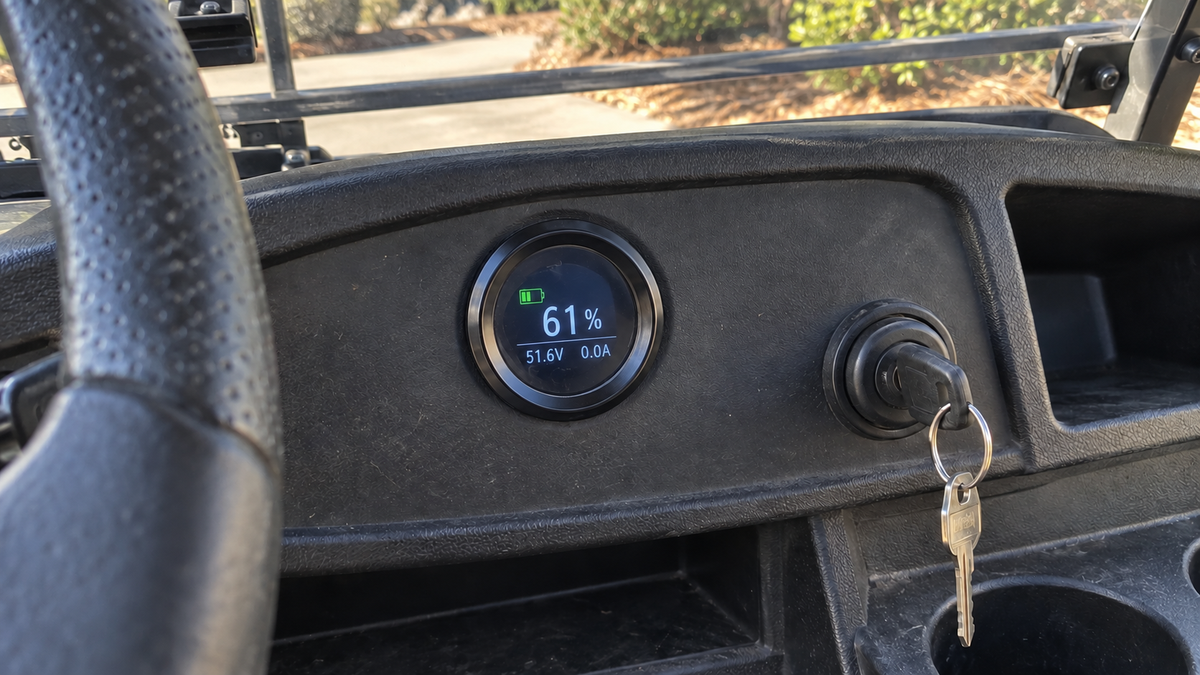

If your lithium golf cart battery monitor is blank or showing the wrong charge level, start with the cart turned off and inspect the monitor wiring, connector, and power source. If the monitor has power but its reading still disagrees with the battery's behavior, check its settings and compare the displayed information with the battery's own status data before replacing anything. Stop if the battery is swollen, unusually hot, damaged, or smells like it is burning. MIT's lithium-ion battery safety guidance also emphasizes following the manufacturer's instructions for the battery and charger.
Check whether the monitor has power

A completely blank display usually points to a power, ground, connector, fuse, or switch problem before it points to an incorrect charge estimate.
- Turn the cart off, remove the key, and disconnect the charger.
- Inspect the monitor's power and ground wires from the display back toward the battery system. Look for a loose crimp, pulled wire, damaged insulation, or connector that is not fully seated.
- Check any inline fuse or monitor switch included with the installation, following the battery or cart manufacturer's instructions for any fuse-related action.
- Turn the system back on and look for any display response.
If the screen returns after moving a connector or wire, the connection is intermittent. Secure the connection and inspect it again rather than assuming the monitor itself has failed. If the display remains blank and you cannot identify its power path, stop at the visual inspection and use the battery or cart manufacturer's wiring instructions or a qualified technician.
If the display turns on but the reading is wrong
A monitor can power up and still show an implausible percentage when its battery profile, capacity setting, sensing connection, or reference point does not match the installed system. First confirm that the monitor is configured for the actual lithium battery system. Do not copy settings from a different battery or cart.
Check these items in order:
- Confirm the cart's system voltage and the battery voltage shown on its label or documentation.
- Confirm the monitor's programmed capacity matches the installed battery.
- Inspect the monitor's sensing lead, shunt connection, or equivalent measurement connection if your installation uses one. A loose or incorrectly placed sensing connection can make the display disagree with actual cart behavior.
- Fully charge the battery with the charger specified for that battery system, then check whether the monitor's reading changes in a consistent way.
If the cart performs normally but the percentage jumps, stays fixed, or falls unusually quickly, record the displayed percentage, the cart's behavior, and any alert shown. That information is more useful than repeatedly resetting the monitor.
Use the symptom to narrow the fault

The symptom usually tells you which part of the monitor circuit to inspect next.
| What you see | Check next | What the result means |
|---|---|---|
| No display at all | Power, ground, fuse, switch, and connector | The monitor may not be receiving power, or its display circuit may have failed. |
| Display works but stays at one percentage | Sensing connection and capacity setting | The monitor may be powered but unable to measure or calculate charge correctly. |
| Reading changes sharply after starting the cart | Sensing connection and battery alerts | The reading may be reacting to a connection, protection event, or configuration problem. |
| Reading looks normal but the cart loses power | Battery alerts, charger behavior, and actual cart performance | The monitor may not be the source of the problem; the battery system may need diagnosis. |
| Display works only when wiring is moved | Connector, crimp, or damaged wire | The fault is likely intermittent and should be repaired before continued use. |
These observations help separate a display problem from a battery or charging problem. A monitor is useful status information, but it does not by itself prove that the battery can deliver normal power under load.
Check alerts before resetting or replacing parts
Look for alerts related to temperature, charging, voltage, or battery protection if the monitor provides them. Write down the alert before clearing it. A repeated alert is more useful diagnostically than a single reset because it shows that the underlying condition may still be present.
Do not open the battery pack or disable its electronic management system to make the monitor work. Use the battery-specific instructions for any reset, pairing, calibration, or configuration step. MIT's lithium-ion battery safety guidance warns against opening battery systems without appropriate training and against using damaged or abnormal batteries.
If the monitor is part of a newly installed conversion, recheck every connection against the kit's instructions. For a system using the supplied Vipboss kit, the product is relevant because the supplied description identifies a monitor as part of the conversion package. You can review the Vipboss 36V 105Ah lithium golf cart conversion kit when you are checking whether the installed package and its monitor match your cart. The product link does not replace checking the actual wiring and configuration of your particular installation.
When to stop troubleshooting
Stop using the battery and arrange qualified help if it is swollen, unusually hot, discolored, physically damaged, or giving off a burning smell. Also stop if wiring becomes hot, a connector shows melting, or the monitor reports a repeated protection condition. Do not continue charging an abnormal battery while trying to make the display agree.
If the battery looks normal but the monitor remains blank after the power path and connections are checked, the likely next step is a wiring diagram or technician-level electrical test. If the monitor works but its reading remains inconsistent after the system settings and sensing connections are confirmed, document the symptoms and contact the battery or monitor support channel. Replace the monitor only after its power and measurement connections have been checked; otherwise, the same fault may make the replacement behave the same way.