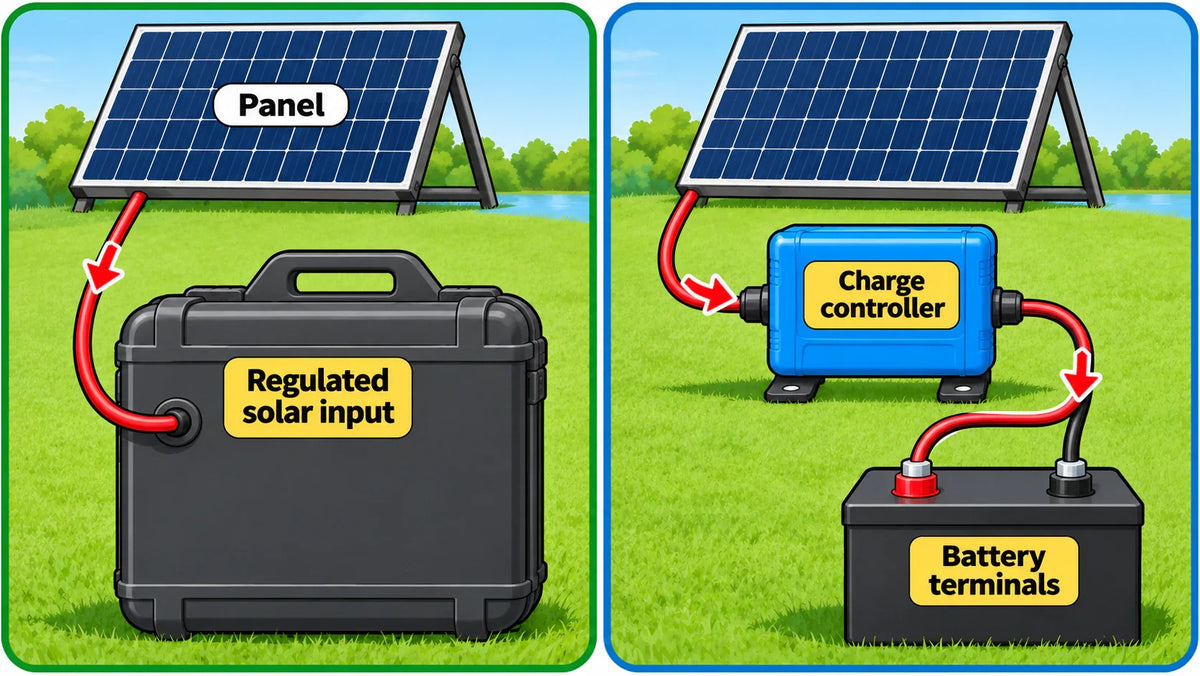

First check whether your LiFePO4 battery box has a built-in, regulated solar input or is simply a battery with terminals. Use only the designated input on a box with built-in solar regulation; for a battery with terminals, connect the panel through a compatible solar charge controller, never directly to the battery.
Identify the connection type

Look for a labeled solar or PV input on the box and check its documentation to confirm that it is a regulated charging input. A power box may contain its own charging electronics, while a battery with exposed terminals does not provide that function by itself.
Record the panel or array’s electrical specifications and the input’s stated limits. For a built-in input, compare those figures and the connector and polarity with the box requirements. There is no universal panel rating or connector for all LiFePO4 power boxes. If the documentation does not identify a solar input or its requirements, do not assume another port or the battery terminals can accept panel output.
If the box has a built-in solar input
- Check the limits. Compare the panel or array specifications with the box’s documented solar-input limits. Include the connector and polarity requirements.
- Use the designated port. Connect the panel only to the identified solar input, following the box’s connection instructions. Do not connect the panel to battery terminals or a different port as a substitute.
- Stop if the match is unclear. If the input type, limits, connector, or polarity cannot be established from the unit documentation, the connection cannot be determined from the battery chemistry alone.
If the battery has terminals

Place a solar charge controller between the panel and battery. The controller regulates panel power for battery charging; the panel should not connect directly to battery terminals. To choose a compatible solar charge controller, match its supported battery chemistry and voltage, charging limits, and PV input limits to the battery and panel specifications.
- Compare the ratings. Check the battery’s permitted charging voltage and current, the controller’s supported battery type and charging limits, and the panel or array’s voltage and current against the controller’s PV input limits. A LiFePO4 label alone does not establish which controller settings or panel sizes are suitable.
- Follow the controller’s wiring instructions. Check polarity and use the wiring diagram, terminals, and connection order specified for that controller. Do not assume a universal sequence: one documented controller procedure requires battery connection before PV for automatic system-voltage detection, but that sequence applies only to the controller covered by that procedure.
- Use the stated charging profile. Set the controller for LiFePO4 only as its instructions and the battery’s charging requirements specify. Do not infer charging settings from panel voltage or battery chemistry alone.
The connection route depends on the box’s actual hardware: a documented regulated solar input takes the panel at that designated port; a terminal-only battery needs a compatible controller between the panel and battery. The actual unit ratings and controller instructions determine the remaining connection details.
FAQs
How do you connect a solar panel to a LiFePO4 battery box with a built-in solar input?
Check the box documentation for a regulated solar input and its voltage, current, connector, and polarity limits. Connect the panel only to that designated input, following the box’s instructions.
Does a solar panel connect directly to a LiFePO4 battery with exposed terminals?
No. Connect the panel through a compatible solar charge controller placed between the panel and battery.
What should you check when choosing a solar charge controller for a LiFePO4 battery?
Match the controller’s supported battery chemistry and voltage and its charging limits to the battery specifications, and check that the panel or array stays within the controller’s PV input limits.
Is there one connection order for every solar charge controller?
No. Follow the wiring instructions for the specific controller; the battery-first sequence for automatic system-voltage detection applies only to the controller procedure that specifies it.