
This guide shows how to tell whether constant inverter beeping is caused by a weak battery or voltage drop in your wiring, and what to test and upgrade so the system runs quietly again.
Constant beeping almost always means your inverter is seeing low or unstable voltage, and the quickest way to separate a bad battery from cable voltage drop is to compare voltage right at the battery with voltage at the inverter while the system is under load.
That piercing alarm at midnight, the lights flickering, and your fridge or well pump cutting out is more than just annoying; it is your backup power system warning that something is wrong. With a simple meter and a few targeted checks, you can usually pin the problem on either a tired battery or avoidable voltage drop in the wiring before anything fails for good. By the end of this guide, you will know what those beeps are saying, how to test for the real cause, and what to upgrade so your system runs quietly and reliably again.
What Constant Beeping Is Really Telling You
Inverters are designed to beep on purpose, not by accident. The alarm is a built-in protection system that wakes up whenever voltage, load, or temperature strays outside the safe window instead of silently letting batteries or electronics overheat, a behavior highlighted in industrial inverter guidance that treats beeping as a critical warning channel rather than a nuisance sound Exeltech inverter alarms. In practical terms, beeping most often points to low battery voltage, overload, overheating, loose or corroded connections, or internal component faults.
Different beeping patterns can hint at different problems. Many units use a continuous solid tone to flag overload and a repeating single beep every few seconds to warn about low input voltage, especially when battery voltage is sagging under load. Some models run an automatic self-test on the battery every couple of weeks and will emit a rapid burst of beeps for about a minute every few hours when the test fails, a pattern that usually means the battery is close to the end of its life rather than a wiring issue.
There are also situations where beeping is a status message instead of a fault. Several AC and backup inverters chirp when they switch from grid to battery power after an outage, which is normal but still a reminder that you are now draining stored energy and need to watch battery state of charge status beeps on AC inverters. The key is to treat any repeated or continuous beeping as a signal to diagnose, not something to “get used to.”
The Core Issue: Low Voltage at the Inverter
For off-grid and backup systems, the most common root cause of chronic beeping is low DC voltage at the inverter input. That low voltage can come from three places that often interact: a discharged or worn-out battery, voltage drop in undersized or long cables, or limited charging from the solar array or generator, particularly in bad weather.
A real-world Renogy case shows how conditions can trick you. A user with a properly sized battery bank and inverter saw constant beeping and shutdowns during a snowstorm even though the charge controller showed the system “charging” snow-limited solar causing alarms. Once snow was cleared from a portion of the panels and the array could deliver real current, the beeping vanished and the inverter behaved normally. The lesson is that what matters is the voltage and current the inverter actually sees under load, not just what a single status icon claims.

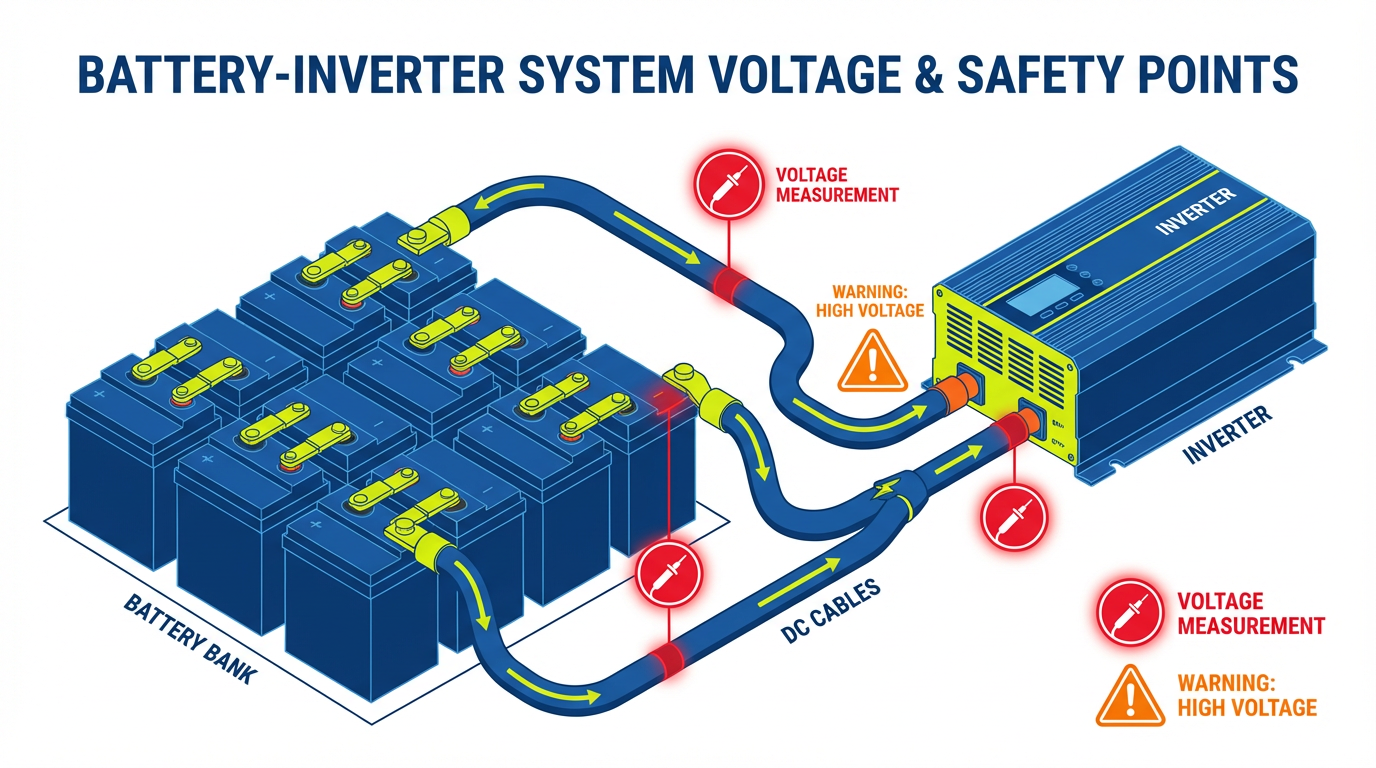
To separate a bad battery from thin cables, think in terms of voltage at two points: directly at the battery posts and at the inverter DC input terminals while the same load is running.
When the Battery Is the Culprit
Low battery voltage is repeatedly identified as the most common reason inverters start beeping. Maintenance writeups and alarm explanations consistently treat low state of charge as the first thing to check whenever beeping starts. If the battery cannot hold voltage, no amount of cable upgrading will save you.
A classic bad-battery scenario looks like this: the inverter starts beeping after a power outage or long night of heavy use, the alarm pattern matches “low battery” or a code such as E02 on the display, and the beeping continues until the battery is recharged generic error codes and low-battery beeps. In a Volta Stage backup inverter case, beeping after an outage turned out to be a deeply discharged battery that needed a full recharge before the inverter would stop alarming and carry load normally again post-outage beeping resolved by charging.
To confirm the battery as the weak link, start by measuring voltage at the battery posts with the inverter running a normal load. If voltage is already low and drops sharply as the load stays connected, then climbs only a little even after hours of charging, the battery is likely tired or undersized for the job. Many inverters make this explicit by running an automatic self-test and then issuing a distinct burst of rapid beeps every few hours when the battery fails that test, often giving you a couple of weeks’ warning to replace the battery before it becomes unusable.
Another telltale sign is that beeping returns quickly after a reset and recharge. You may silence the alarm by turning the inverter off and on again, or by letting it charge for a short period, but as soon as you reconnect normal loads the same low-voltage code pops up. When that loop repeats, the most productive “upgrade” is usually a proper capacity and health check on the battery bank rather than chasing wiring ghosts.
When Thin Cables and Voltage Drop Are to Blame
Undersized cables are the stealth enemy in many off-grid retrofits. Technical guides warn that using cables that are too small for the current or too long for the run between battery and inverter creates high resistance, extra heat, and enough voltage drop to trip low-voltage alarms even when the battery itself is relatively healthy. The inverter does not care why the voltage is low; it only knows that what reaches its terminals is below the threshold, so it beeps and often shuts down to protect the electronics.
In practice, cable-driven voltage drop often shows up only when loads are heavy. The system may sit quietly with a few lights and a laptop running, then erupt into beeping as soon as you start a microwave or a deep well pump, even though the battery tested fine earlier at rest. A quick measurement will usually tell the story: if battery voltage looks reasonable at the posts while the inverter is complaining, but the voltage measured right at the inverter’s DC input is significantly lower at the same moment, the missing volts are being burned off in the cables, connections, or breakers between the two points.
Solar inverters can suffer similar problems on the panel side. When cables from the array to the inverter are too small or poorly terminated, resistance and heat increase while voltage at the inverter drops, and some manufacturers explicitly call out “incorrect or undersized cable selection between panels and inverter” as a common cause of under-voltage alarms and persistent beeping. Combine that with partial shading, dirt, or snow as in the Renogy case, and the inverter may be starved even with plenty of hardware in place.
If cables or lugs feel unusually warm during operation, insulation is discolored, or you see obviously thin conductors feeding a high-wattage inverter over a long distance, it is wise to treat wiring as a prime suspect rather than a minor detail.
A Practical Field Check to Separate Battery from Cables
The fastest diagnostic sequence many technicians use does not require any special tools beyond a multimeter and the ability to read the inverter’s display. First, reduce the load by unplugging nonessential appliances and see whether the beeping stops. If a constant tone immediately shifts to an occasional chirp or disappears altogether when you drop large loads, overload or low voltage under heavy load is in play, and you now know the problem is not purely a random electronics fault.
Next, read the display and note any error codes, icons, or text messages. Many consumer inverters use a consistent set of codes such as E01 for overload, E02 for low battery, and E03 for battery disconnected, and those codes are deliberately tied to their audible alarm patterns so that you can match sound and message without guessing. If the code clearly calls out “low battery,” it is time to focus on state of charge, age, and charging behavior of the bank before you touch the wiring.
After that, check every accessible connection: battery posts, lugs, fuses, disconnects, and the DC terminals on the inverter. Maintenance articles on inverter reliability estimate that nearly a third of failures come from preventable issues like loose connections and neglected batteries, which means a wrench and a wire brush can eliminate a surprising number of “mystery” beeps long before you buy new hardware. When tightening, aim for firm and secure rather than excessive force that might crack lugs or strip studs.
With those basics covered, measure voltage directly at the battery and at the inverter input while a moderately heavy, real-world load is running. If both readings are low, the battery is not keeping up and needs deeper testing or replacement.

If the battery voltage is acceptable while the inverter input is noticeably lower and the beeping persists, the cables and terminations between the two are robbing you of usable volts and need to be resized, shortened, or rebuilt.
Finally, watch how the system behaves across days, not just minutes. If beeping tends to return at the end of cloudy days, after long outages, or during seasons when solar input is weak, you may be running a chronic energy deficit that is aging the battery prematurely. When alarms come back quickly even after proper charging, increasing battery capacity or adding more charging input will usually yield a bigger improvement than swapping yet another set of cables.
Quick Comparison: Bad Battery vs Thin Cables
The table below summarizes common field clues that help you decide where to focus first.
Check or Symptom |
Bad Battery More Likely When… |
Thin Cables or Voltage Drop More Likely When… |
Beeping pattern over time |
Alarms start after long outages, cloudy days, or late at night and often pair with “low battery” codes or periodic self-test beeps that recur every few hours. |
Alarms line up with starting heavy loads such as pumps or microwaves and disappear as soon as those loads are removed, even though the battery appears charged. |
Voltage at battery vs inverter |
Voltage is low right at the battery posts and drops further under load, then recovers only a little even after extended charging. |
Voltage at the battery looks solid, while the inverter input voltage is noticeably lower at the same moment under the same load. |
Physical clues |
Battery is old, often cycled deeply, may show swelling, corrosion, or uneven cell behavior; the inverter may have a history of battery-related error codes. |
DC cables feel warmer than expected, runs are long and thin for the inverter’s wattage, or you see visibly undersized conductors or questionable terminations. |
Behavior after reset and recharge |
Beeping returns quickly after a full recharge and reset, even when loads are modest, indicating reduced capacity rather than wiring loss. |
Beeping improves when you temporarily shorten the cable run, move the inverter closer to the battery, or use heavier temporary leads for testing. |
Using this comparison keeps troubleshooting focused and prevents the common trap of replacing components in the wrong order.
When to Stop DIY and Call a Professional
There are clear points where pushing forward on your own stops being productive and starts being risky. If beeping continues after you have reduced the load, checked and tightened all connections, verified that the battery is fully charged, and ruled out obvious cable issues, it is time to bring in a technician who handles inverters regularly. Persistent alarms paired with any sign of burning smells, melted insulation, or unexplained shutdowns should be treated as urgent.
Some brands also have long warranties and expect faults to be handled through installers rather than deep DIY disassembly. In at least one SolarEdge case, forum contributors pointed out that the shortest inverter warranty offered was about a decade and urged the owner to lean on the installer rather than tear into the unit and risk voiding coverage. That kind of advice applies to many modern hybrid and grid-tie units with complex monitoring and sealed electronics.
Online expert services can be helpful when you are stuck on model-specific codes or behavior that the manual does not explain clearly. Owners facing stubborn post-outage alarms have used remote experts to confirm that the battery was the limiting factor and to walk through reset and test procedures safely without guesswork post-outage beeping resolved by charging. The goal is always the same: protect the battery bank, protect the inverter, and protect your loads.
FAQ
Does constant beeping always mean the inverter itself is bad?
Constant beeping almost never means the inverter is the first thing that has failed; it usually means the protection circuits are doing their job and reacting to low battery voltage, overload, overheating, or wiring issues. Industrial inverter manufacturers and home backup case studies repeatedly show that recharging or replacing weak batteries, correcting overloads, and fixing cable problems solve the vast majority of beeping complaints without replacing the inverter electronics.
Is it safe to keep using an inverter that beeps intermittently?
Occasional single beeps during normal mode changes can be harmless, but running through repeated low-voltage or overload alarms is hard on every part of the system. Low battery warnings exist to prevent deep discharge that can permanently shorten battery life, while overload and overheating alarms are trying to stop damage to inverter components and connected appliances. If the same alarm pattern keeps coming back, treat it as a red light to diagnose and fix the root cause rather than background noise.
Can a brand-new battery still cause inverter beeping?
Yes. A new battery that leaves the shop undercharged, sits partially charged for too long, or is connected with poor or loose terminals can trigger low-voltage or “battery disconnected” alarms just like an old one. Real-world help-desk cases after power outages show beeping inverters returning to normal operation as soon as the battery is fully charged and connections are confirmed solid, with no other hardware changes required post-outage beeping resolved by charging.
A beeping inverter is not just noise; it is a performance report. Use the alarms to your advantage, test voltage at the right points, and upgrade in the right order—battery health first, then cable quality and routing, then overall system balance—so your off-grid or backup setup runs quietly, efficiently, and ready for the next outage.