
Water, dirt, and heat build up around a battery for different reasons. Water usually enters through a leak, splash path, spill, or condensation. Dirt accumulates when an open, dusty, or floor-level compartment continually exposes the case and terminals. Unusual heat develops when charging, electrical load, a loose connection, poor airflow, direct sun, or an internal battery fault produces heat faster than the area can release it. Identify the source before cleaning, because wiping the symptom away will not prevent it from returning.
Why water builds up around a battery
Water may reach the battery through a roof or door leak, road or wash-water splash, a nearby spill, or runoff that follows a cable into the compartment. Condensation is another common source: warm humid air can meet a cooler battery case or metal compartment wall and leave moisture even when no leak is visible. Water that appears to come from inside the enclosure can indicate case damage or leaked material and needs qualified assessment.
Trace the moisture pattern before drying it. Streaks below a seam suggest a leak; droplets spread across cool surfaces suggest condensation; a wet low point suggests poor drainage; and moisture concentrated near a damaged case or terminal requires more caution. Disconnect charging and loads before moving or wiping the battery, then correct the entry path, ventilation problem, or drainage issue.
If moisture has entered the enclosure, the case is cracked, or corrosion keeps returning after the area is dry, do not put the battery back into service until it has been assessed. Water and electricity can create a short-circuit hazard, and a damaged enclosure is not an installation-area problem that cleaning alone can fix. Battery work also calls for eye protection, gloves, and care around stored electrical energy; the Texas Department of Insurance safety guidance warns about short circuits, sparks, battery damage, and keeping batteries free of excess dust. See the Vehicle Battery Safety Fact Sheet for these precautions.
Why dirt collects around the battery and terminals
A light film of dust usually comes from ordinary airflow through an open compartment. Faster buildup points to a stronger source: an uncovered floor-level location, a ventilation opening aimed at the battery, road dust entering an exterior bay, nearby sanding or workshop activity, or oily residue that traps particles. White or blue buildup at a connection is corrosion rather than ordinary dirt and may accompany moisture or a poor terminal connection.
Repeated contamination matters because debris can hide cracks, corrosion, looseness, and heat discoloration. Conductive or damp contamination near energized connections can also create an electrical path. With charging and loads disconnected, remove loose dirt from the outside with a dry, nonconductive cloth. If a terminal or cable is corroded, loose, burned, or frayed, have the connection repaired rather than cleaning and immediately reconnecting it.
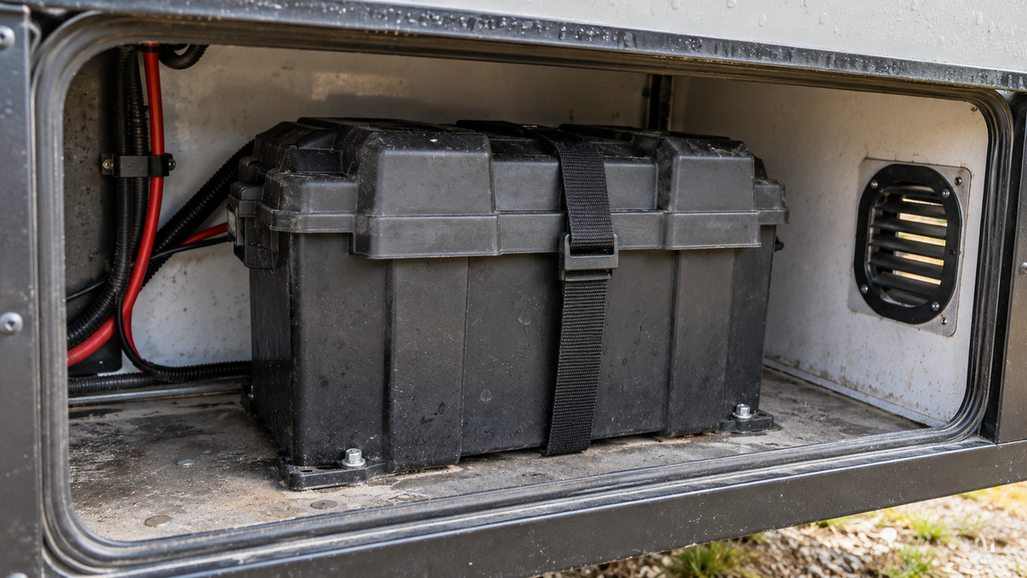
Prevent recurrence by shielding the compartment from the identified dust path while preserving the ventilation required by the battery and equipment. Keep the battery supported above dirty or wet floor surfaces and leave enough access to inspect the case and connections. The goal is not a spotless appearance; it is a stable environment where new contamination or damage is easy to notice.
Why heat builds up around a battery
A battery becomes hotter than its surroundings when it absorbs heat from the environment or generates heat during electrical operation faster than that heat can dissipate. Direct sun and a sealed compartment add environmental heat. High charging or discharge current adds operating heat. A loose, corroded, or undersized connection can concentrate resistance and create a hot spot, while an unsuitable charger or internal fault can heat a wider area of the battery.
The location and timing of the heat help identify the cause. One hot terminal or cable end points toward connection resistance. Heating that begins only under acceleration or another heavy load points toward current demand or a weak connection. Heating during charging points toward the charger, charge rate, connection, or battery condition. A uniformly hot case in a shaded, ventilated area raises concern about workload or an internal fault.
Turn off charging and the load, then let the battery cool naturally; do not cool it with water. Once it is safe to inspect, look for melted insulation, discoloration, a burnt smell, blocked vents, or direct sunlight. Do not restart a battery that is swelling, smoking, leaking, or heating again.
The installation area should be shaded, ventilated, free of flammable materials, and protected from vibration and impact. Do not seal a battery in a small unventilated box just to keep dust out. If the battery becomes hot again after the area and connections are corrected, stop using it and obtain qualified service.
Match the correction to the cause

After identifying why the condition developed, use this order to correct the source and verify that it stays corrected:
- Isolate the battery. Turn off the charger and connected equipment, disconnect the appropriate circuits, and prevent accidental reconnection while you work.
- Remove the cause. Stop the leak, eliminate the splash path, reduce dust, block direct sun, or clear the airflow obstruction. Do not merely wipe the symptom away.
- Prepare a stable surface. Keep the battery upright when the battery instructions require it, level, supported, and protected from movement. Do not improvise a wall, ceiling, or suspended attachment method.
- Inspect the connections. Look for loose hardware, corrosion, exposed conductors, melted insulation, or cable strain. Damaged parts need repair or replacement before operation.
- Restore only after the condition is gone. The area should remain dry, clean, ventilated, and accessible for inspection. If the same water, dirt, or heat returns, treat the recurring condition as evidence that the installation is still unsuitable.
For a replacement battery, the Vipboss 12V 105Ah Bluetooth LiFePO4 Lithium Battery offers Bluetooth monitoring and low-temperature charge protection in a 12.8V, 105Ah package with a 100A smart BMS, an IP65 enclosure, and Group 31 sizing. You can view the Vipboss 12V 105Ah Bluetooth LiFePO4 Lithium Battery if those features fit the space and system you are correcting.
When to stop instead of cleaning or relocating it
Stop work and seek qualified help when you see a cracked or swollen case, leaking material, smoke, repeated overheating, melted terminals, exposed conductors, or damage that you cannot identify. Keep sparks, flames, jewelry, and metal tools away from battery terminals. Do not attempt to rebuild a damaged battery or guess at a charger setting.
Once the battery is isolated and the installation area is dry, clean, ventilated, stable, and free of recurring contamination, reconnect it only according to the battery and equipment instructions. If the warning sign returns, the area or the battery still has an unresolved fault.
FAQs
What should you do first when water, dirt, or heat builds up around a battery?
Stop charging and disconnect the load if you can do so safely, then isolate the battery from accidental reconnection. Identify and correct the source of the moisture, contamination, or heat before cleaning or returning the battery to service.
How should you correct an installation area that is exposing a battery to unsafe conditions?
Move the battery to a stable, level location that is clean, dry, shaded, ventilated, protected from water and impact, and accessible for inspection. Remove leaks, splash paths, dust sources, direct sunlight, and airflow obstructions, then inspect the terminals and cables for looseness, corrosion, exposed conductors, or damage.
When should you stop cleaning or relocating the battery and seek qualified service?
Leave the battery isolated and seek qualified service if the case is cracked or swollen, the battery is leaking, smoking, repeatedly overheating, or has melted terminals or exposed conductors. Do not restart a battery that heats again after the installation area and connections have been corrected.